

Daniel's NL2 Stuff - NEW: Convert Images to Objects!

How to use NL2 Coaster Animations in External 3D Software
If you want to use your NL2 Coaster in another 3D Environment, I have recently tested, now polished and released a way how to apply information logged by NL2 onto a curve that is present in blender, from there you can go to virtually everywhere with that information.
Here is a comparison between NL2 and the imported animation data in blender.
Download it here - a detailed picture tutorial is included.
Ensure you extract / copy the zipped base directory and not its contents since it contains a hidden resource directory as well which might not be extracted on some systems otherwise.
Note: You probably also want to use the blender CSV importer to import your own spline curve that you can export with the NL2 Professional version.
I have uploaded a script that lets you easily create custom animated gates like turnstiles and similar for your parks when you are familiar with usual 3d authoring software. Just assign some keyframe animation and then create a helper object for the desired movement area!
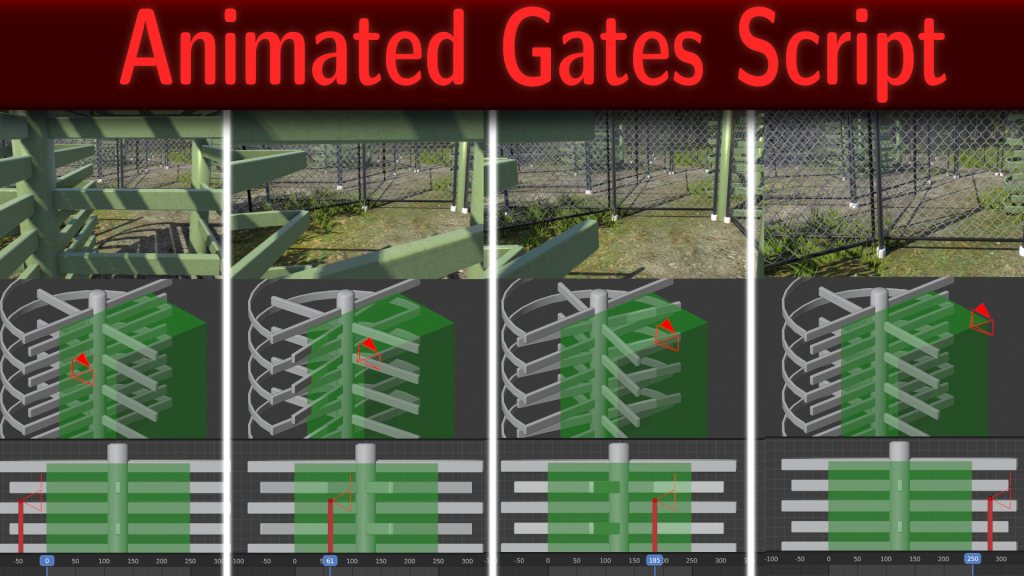
Steam Workshop (read for more info)
Google Drive (Temporary Upload)
Hey guy, I have just released a script package for attaching objects to almost everything including other objects:
Download links in the Video description on YouTube.
You little mad scientist!
If you liked the Scalable Build Shapes but you want more material options I have good news for you:
Hi, since someone ask on the Discord channel if there are any packs of track elements, I thought I could repost (since NLE times) my center of rails roll and heartlined to center of rails roll nl2 formula elements for usage on coasters that usually roll around NL2's static heartline.

I have to say A BIG THANK YOU! For all your workshop parks and scripts and tools!
This is not simply awesome. You have expanded NL2 in a very well, thought out way. As someone who knows, time is a important thing in life, thank you for investing your time to make this features happend.

bestdani , i'm looking for a scipt thats activated by tracktriggers that starts a timer to make an object rotate.
I have just uploaded this funny, small, but potentially very useful tool for NL2:
Drag and Drop Images as Objects Tool

Greetings,
Daniel

Thank you for all the scripts. These are fun to play with. You would know best. I need to learn how to make a drop track. Can you show me how to do that?
@UtahCoasterEnth :
See here : https://www.youtube.com/watch?v=9LEMQ9vn_Ew

Question about instant animation: is it possible to change the animation speed? I'm wanting make a dropping chain lift on the second lift of my Boomerang coaster.
Sasquatch787 posted on January 30th, 2021
Question about instant animation: is it possible to change the animation speed? I'm wanting make a dropping chain lift on the second lift of my Boomerang coaster.
Check your FB inbox
MrRC posted on January 30th, 2021
Check your FB inbox
why do you never just post your advice here in case someone needs it in the future?
We both dutch and we both friends in FB, so its easier to communicate. but i can place the solution here
u make a FAKE 2nd chainlift as object, find the right off ride video for the audio.
Take and modify a script that make the object move, place the tracktriggers in the coaster u working on.
Keep trying untill the right effect is accomplished.
Here is the result :
bestdani posted on September 11th, 2019
How to use NL2 Coaster Animations in External 3D Software
If you want to use your NL2 Coaster in another 3D Environment, I have recently tested, now polished and released a way how to apply information logged by NL2 onto a curve that is present in blender, from there you can go to virtually everywhere with that information.
Here is a comparison between NL2 and the imported animation data in blender.
Download it here - a detailed picture tutorial is included.
Ensure you extract / copy the zipped base directory and not its contents since it contains a hidden resource directory as well which might not be extracted on some systems otherwise.Note: You probably also want to use the blender CSV importer to import your own spline curve that you can export with the NL2 Professional version.
I'm able to get the animation of the coasters applied to objects on the spline, but it's misaligned...it's speeding up the lift and slowing down the drops lol. Am I missing a step? Or did you just manually keep fiddling with the offset until it looked like it matched? I'm using the corkscrew coaster in the template. Would really appreciate any tips on how you got it working.
I think it might also be because the track spline as imported starts after the station, rather than at the starting position of the train if that makes sense?
Hi all, I have been using the NL2 coaster animations tool to export my coaster's spline into Blender. I have successfully done this and the coaster works perfectly except for a small issue. At three stages of the spline, the curve roates drastically however this doesn't show up in nolimits 2. Is there any way to fix this? I've tried shortcuts like Alt T and Ctrl T to rotate the points myself however it just makes the issue worse.
bestdani posted on November 3rd, 2019
Hey guy, I have just released a script package for attaching objects to almost everything including other objects:
Download links in the Video description on YouTube.
@ bestdani,
is it possible to attach an external camera to an object ( like in The Ultimate Attachment Tool) ? wich is NOT the bogie or coach ?
All scripts do follow the coach or bogie.
I made this but like to have a POV camera attached to the seats.

This has 6 axes movement.
EDIT : Got it.
How to convert videos from NL2 or for NL2 Video Screens?
Since this question pops up quite often I just uploaded all required files and links a very short installation and usage instruction about how to painlessly convert videos from NL2 (and yes this actually works for media of any kind when you have setup preset batch files!).
Should take about 2 minutes to install and set up and from then on just 1 second to start a video conversion in the future!
Get and read it on github!
important use the 32 bit ffmpeg version in combination with my templates to convert to ogv for NL2 usage since the 64 bit binary seems to produce broken ogv files with lots of artifacts, here's a direct link to a working 32 bit windows version: https://ffmpeg.zeranoe.com/builds/win32/static/ffmpeg-4.2.2-win32-static.zip