

NL2 Ask Thread

j88 posted on August 18th, 2020
i'm trying to create my first Dark coaster (ala The Many Adventures of Winnie the Pooh at WDW), and am completely struggling. Can't find any tutorials on how to create a dark ride (was able to do it using tunnels, but it looks horrible). Am I being blind? Or can someone point me in the right direction of how to do it please? Thanks
U can make LARGE square box in Sketchup and export it as *.DAE file and place it around your coaster.
Hello everyone !
I've some trouble exporting videos and screenshots recently : the screenshots are no longer saving to the computer, and the following error message shows in game, "permission denied" for video exports.
Does anyone knows why this occurs ?
Thanks a lot in advance !
From main menu (just after startup, click on SETUP , then choose : VIDEO EXPORT)

U can see where your video is stored.
Well actually I know where my videos are supposed to be exported (and I already tried to change the output folder). The matter is that they can't be exported :(
When I try there's the following error message : "permission denied"...
Toto662 posted on August 26th, 2020
Well actually I know where my videos are supposed to be exported (and I already tried to change the output folder). The matter is that they can't be exported :(
When I try there's the following error message : "permission denied"...
When u double click on a video file , does it play normal ?
Yes it does :( it's when I start recording that this error message shows itself
Toto662 posted on August 26th, 2020
Yes it does :( it's when I start recording that this error message shows itself
Is the storage location on Google Drive or on Harddrive on your system ?
It's on the C: drive -> My documents -> com.nolimitscoaster.nolimits2
Toto662 posted on August 27th, 2020
It's on the C: drive -> My documents -> com.nolimitscoaster.nolimits2
So when u in NL2 and start the recording u get the error message ?
MrRC posted on August 27th, 2020
So when u in NL2 and start the recording u get the error message ?
Yes, exactly !
Can u make a screen shot (with the error message) without revealing your project ?
Yes of course :)
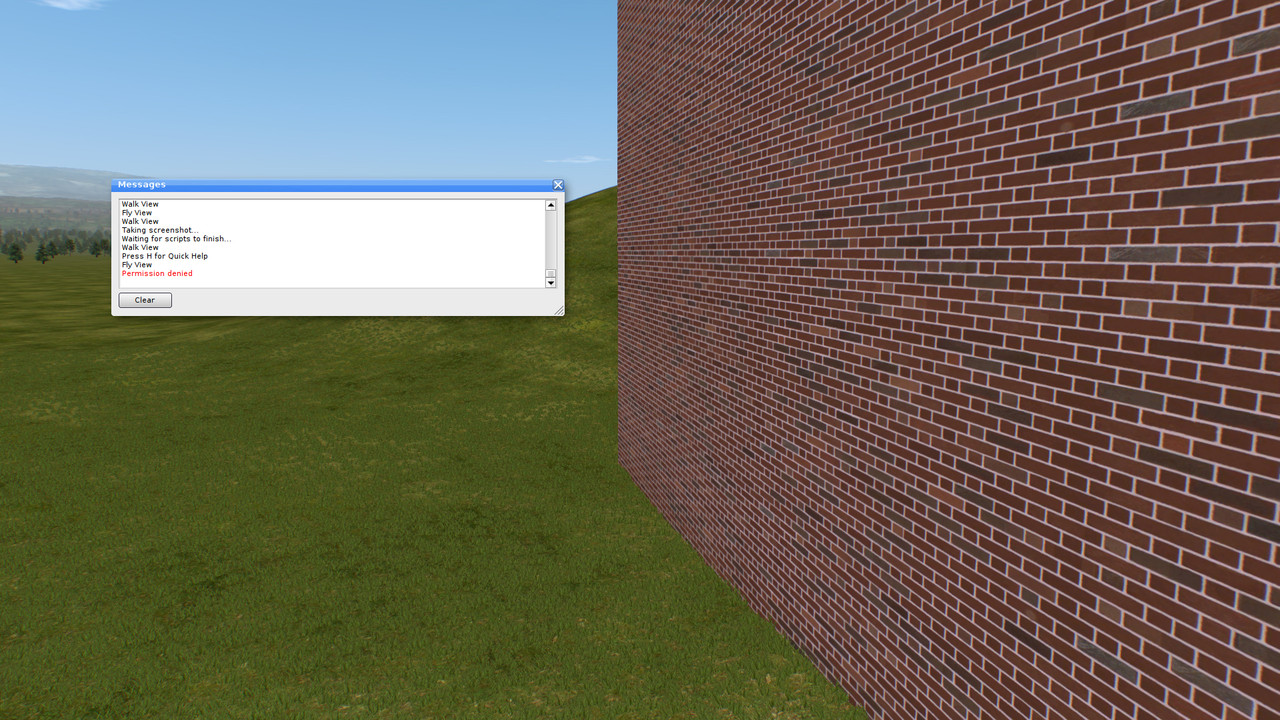
So the screen shot taking does work, but i don't see why u get this very strange message with Permission Denied.
Does it pop up after taking a screenshot ?
MrRC posted on August 27th, 2020
So the screen shot taking does work, but i don't see why u get this very strange message with Permission Denied.
Does it pop up after taking a screenshot ?
Well actually the screenshot taking doesn't work either : i've taken this screenshot using my computer's screenshot device.
When I try to use Nolimits screenshot device, nothing happens. On the message boards it's written "Taking screenshot..." but the screenshot is never taken !
The message you've seen pop up just after I've pressed "O" for recording a video.
Ok now its very clear. Never ever seen this strange behavior with NL2. Make contact with somebody from NL2 team on nolimits@nolimitscoaster.com
Pro Version question about bogie distance. I see fintamin made a nice chart on bogie distances. I assume this is the left to right distance not front to back spacing of the axles. If it is the gauge does the type of coaster change the export spline left and right distance numbers? Or are they always the same no mater what coaster style you build and export?
thanks
In case anyone else has the question here is the answers to my questions:
gauge is from center of rail to center of rail
bogie distance is from car 1 bogie to car 2 bogie
export spline is always the same as it only follows the geometry of the centerline. If you change the style of the coaster you can see that the gauge changes but the centerline remains in the same position (I assume the left and right splines do not change either)
wildcat A posted on August 28th, 2020
Pro Version question about bogie distance. I see fintamin made a nice chart on bogie distances. I assume this is the left to right distance not front to back spacing of the axles. If it is the gauge does the type of coaster change the export spline left and right distance numbers? Or are they always the same no mater what coaster style you build and export?
thanks
U might try to send him an PM directly. He can answer that.

Is there a way to use an FVD exported element in a backwards mode? I've created 3 parts in FVD, the first part being the foward part, the second being the backwards part which I want to connect to the back side of a fork switch. So is there a way I can connect it correctly?
^ None that I am aware of, unfortunately.
Hi! Since I'm not sure which thread this question belongs, I'll ask it here.
Does anyone know where I can find the old NL2Cast episode where they talk about the Roundup 100 winners? It appears to have been taken down from the NL2Cast YouTube channel along with all of their other episodes. Even if the podcast series has been cancelled, I'd really like to listen to that particular episode if it's still available somewhere!
I know at one point in time someone was working on Mack Extreme Spinner trains, did those every get finished, and If so does anyone have them. Thank you!

Is anyone else having issues uploading rides/parks to the exchange at the moment?
I've tried multiple times recently, and every time i've had an error.
Hi guys, do you know if a Chance Rides CP Huntington train is available somewhere to download and install in a park?
I made a track in Nolimits 2 then exported the splines to Solidworks. I then extruded the splines to a custom rail shape. How do I get this new rail shape back into Nolimits? Its the exact path and size of track I exported. Its just a slot car solid deck now following the path generated by NoLimits. Solidworks does not export 3ds, dae or obj files. They make sure you can't play with Autodesk products. I do not have access to 3DSmax. For simplicity sake I would like to import the SW model over the NL track and hide the NL track. Then run the car using NL and it should look like it is running on the deck. Any ideas.
thanks,
I was able to export the track deck from Solidworks as a STL file. Then used Meshlab to save it as a .3ds file to add to NL. Problem is most of the mesh is missing. It shows up fine in Meshlab but when loaded into NL only a 20% is there. Tried export re-save multiple times and the same parts are missing. I can load the stl into any program and all of it shows up. Any ideas?
i'm trying to create my first Dark coaster (ala The Many Adventures of Winnie the Pooh at WDW), and am completely struggling. Can't find any tutorials on how to create a dark ride (was able to do it using tunnels, but it looks horrible). Am I being blind? Or can someone point me in the right direction of how to do it please? Thanks