

The Official 3D Modeling Thread (Ask, Showcase, etc.)

^^ That's exactly what I did with the platform object. It was one piece before and I splitted it and merged again with the array modifier to make it one piece with a resulting stacked UV in the end. This would also work for your larger one piece model.

Result (after applying the modifier)
For other loose parts I recommend to do the same which is about what Womp83 recommended, split them into separate objects, map one of the objects, than change these to the single mesh object as I did in the movie.
For better performance in game engines, 3d printing, ... you can of course join / or merge them again in the end. The "multi UV edit" and "smart join" blender addons might be your friends for that work.
But it's also not that hard to manually stack the pieces you show, with enabled snapping it can be done quite fast, I guess in your case even faster than any other approach.

Not stacking the UV pieces exactly can be also useful to have some slight variations, at least for tiling parts on your atlas that might also work. ;-)
Tobi posted on January 6th, 2018
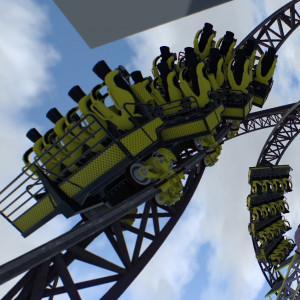
Don't want a Lech Coaster with custom trackstyle if there's no custom train. So here it is:
will that train be released? also was it difficult to make the track?
^I can speak for Tobi that making custom track is incredibly easy, and only requires minimal knowledge of modeling. I can make a tutorial this weekend if anyone would like one.
Trains are pretty difficult. Especially those with a lot of different curvature.

^ Please make a tutorial of the track as Id like to know this as well. I have slight knowledge on the matter but a full on tutorial would be fantastic!
Working on a new project, hopefully it'll see the light of day!

Substance Painter is one hell of a drug...

What the hell? Is that NL2?
^Unreal Engine

OMG, this is not happening in front of my eyes , right ???

^^ Nice texturing !
Hope that pbr is coming real soon lol (especially some improvements with the metallic output)


Mrcrolly posted on January 21st, 2018
Working on a new project, hopefully it'll see the light of day!
Substance Painter is one hell of a drug...
You forgot the part where you say "I'm Rick James, bitch.." But replace 'Rick James' with your name.
That looks pretty good.
Another question about Substance: Does it seam & unwrap a mesh for you (like a smart uv unwrap), or do you have to do that yourself in your modelling program before you import it?
^no, you have to unwrap it first with your 3d modeler software
^ Cool, thanks. I had a feeling it would be like that.
Mrcrolly posted on January 21st, 2018
^Unreal Engine
Now I'm wondering how that scene would look like in NL2. I guess there wouldn't be a huge difference. ;-)
@MrRC, @HelloHurricane - Thanks for the compliments, I really appreciate it :P
@Womp83 - You have to unwrap it yourself. It's not all that hard once you get the basic logistics of it. Thanks for the compliments as well!
@bestdani - Hopefully in the future I can bring forward a project for the next RU, making models takes SO much less time with substance painter and come out drastically better. And with PBR coming to NL2 I can only expect great things in terms of graphics.

Some more progress of the same scene, I'm really proud of how it's turning out so far. For a little more insight on the project, I'm currently developing a free-roam paranormal investigation game that takes place in a haunted attraction. Going to keep details small until I flesh it out fully but if I actually get anywhere with the project then I'll most definitely make a separate thread for it.


Been trying to model a generic station in sketchup today, here is the result so far

There is an issue though. the middle roof's supports are in the way of a lot of things and just feel really awkward.


Anyone got any ideas for an alternative design? I dont mind if I have to redo it, but at the moment idk what to do instead
@Coasterguy best thing I could think of would be to add lateral bracing across that the beams can connect to opposed to them going into/through the ground. Not sure how realistically sound that would be though.
Meanwhile, I'm still loving substance painter.

^ That looks great. Even better than your wall, lol.
That's it, i'm getting Substance Painter. Not just for NL, but so i can make all my 3d shit look like that.
COASTERGUY246 posted on January 22nd, 2018
Been trying to model a generic station in sketchup today, here is the result so far
There is an issue though. the middle roof's supports are in the way of a lot of things and just feel really awkward.
Anyone got any ideas for an alternative design? I dont mind if I have to redo it, but at the moment idk what to do instead
I'd suggest something similar to what Mrcrolly said. If there's a way you can support that middle section of roof without having the vertical beams, and make it look legit, then that's prob the best option. Otherwise you move the beams so they're not in the way of the queue.
With all the discussion about modelling and software for this going on - not only here - I felt like I should try to make a video about a bit strange guy that wants to learn blender to make some simple objects the first time in his life. ;-)
^^Thanks womp! Can't wait to see the work you produce haha
Bestdani. holy hell. I can't stop laughing at the tone of this tutorial. You're the hero this forum needs but not the one it deserves.
I'm less than one minute in and laughing my ass off...

NGL i think i actually learned more about blender from this tutorial then any other i could find elsewhere....
Wonderful :)
I'd like to think we've now established a precedent on these forums for frustrated Blender users snapping and then creating slightly petty response videos.
Haha... so funny.
bestdani posted on January 25th, 2018
With all the discussion about modelling and software for this going on - not only here - I felt like I should try to make a video about a bit strange guy that wants to learn blender to make some simple objects the first time in his life. ;-)
That should be an official Blender beginners tutorial.
Another way to texture multiple objects using a single UV texture. If it's multiples of the same object like horses on a merry go round for example, once you've modelled the first one, unwrap and texture it, then make copies using the array modifier or copy/paste and place them or whatever you need to do. That way, all further copies of the object will use the same texture from the original. I did that for the windmill blades on my Thomas the Tank Engine ride. Big time saver.
Edit: Your best option would be to delete one half of that, then half it again, leaving a quarter piece, like the platform in Dani's video. Then you've got far less uv bits to worry about. Then make it complete again using the array modifier.
Also, why are you using the Blender render mode? Use cycles, it's much better, lol.