

The Official 3D Modeling Thread (Ask, Showcase, etc.)

LostSoul1599 posted on April 3rd, 2019
why dont you start with a shell? Its a modle that you put over the actual train without creating a complete new one it worked for me with the collada format (i used blednder tho for the material)
That's what i usually try to do where possible. A shell is much easier than a full custom train, lol.
Re. your air vent question: I don't do keyframe animation a lot, so i don't know a huge amount about it, and someone else can likely can fill in the gaps or correct me if i'm wrong. But have you actually baked/applied the animation to your object?
Codemaster has a video about keyframing on youtube that i use when needed (it's old-ish, but still useful) If you want, and if i can find it, me or someone can drop a link to it in here.

When exporting key frame animations ensure that this option is selected (affects both 2.79 and 2.8 beta builds afaik):

I can't remember what's the exact issue with the Matrix option, but there was one in combination with NL2.

EDIT : No further help is needed.
Who can help me to import a *.DAE file and convert its to *.3DS with Blender or so. My Sketchup Pro 2014 does quit exporting when i export that *.DAE file to *.3DS. I need that *.3DS file to make it turn around the Z axe. *.DAE doesn't do work with that in NL2.
There is both a dae import and a 3ds export option in the File -> Import or File -> Export menu in blender, this should work straight forward.
But since in NL2 the up axis is Y you have to rotate around Y as well, I don't think using 3ds instead would make any difference.
@ bestdani. If i use an DAE file and try to make it rotate around the center axis, it does not ratote exacly around it. And i know a 3DS model does. I don't use Blender. So maybe someone can convert it for me.
Its a very complex DAE model.
EDIT : Got it fixed using a 30 day free Trial version of Sketchup 2017 PRO
As u can see in the small video :(with DAE model)
FIXED version :
EDIT : Found the font : called Decotura ICG
Who knows what FONT is used ?


Is there any way i can make anything similar with Sketchhup or Blender( or any other free software?) Doest have to be this detailt but should be a canyon that looks kinda similar

Yes sure, for something like this probably the sculpting feature of blender might be the most helpful one, but you can find lots of tutorial or inspirational time lapse videos about this topic that also show other useful techniques how to get this done rather quickly.
I've made this clip with sketchup with the sandbox tool and then used the ersosion extensio to make it look a bit more realistic. but because of this it got waaay to big to handle for sketchup because there are like 600000+ faces so when i try to texture it it always crashes after a few minutes. Is there any programm where i can maybe texture it or do something similar to this? (and maybe something other then blender. i'm not a big fan of it)

I have a question, when using blender, I tested exporting in .dae but the materials that are on the object don’t come with it for example I tested the glass material to make it see through.
@ Emeroaster U have to add an NL2MAT to your glass surface in your object.
Once u placed your object in the NL2SCO Editor, open the object in the NL2 Editor, go to MATERIALS , chose your surface color / name from your glass surface , like glass or what u named it.
Click on it ONCE,
Click SELECT and chose your NL2MAT file with the glass file.
Click on OK.
Click on SAVE to store your NL2MAT file in your object.
Click once the object in your park on Click on RELOAD.
If u done it right u can see the surface changed.

Where can I find the modern intamin trains, such as the ones used in TCM's Excalibur. I figured I should ask first rather than spend ages digging around in the forums.
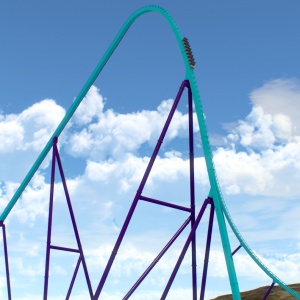
The trains on Excalibur are not released, but you can find his other modern Intamin trains in the resource thread.
ok thanks
I tested if it's possible to make interactive applications / games that are rendered using blender 2.8's real time viewport (release candidate online!).
You can see the result and a find a link in the description:
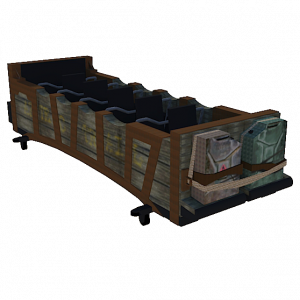
During the last days I tried to recreate the "Diabolic Dice" from the teaser of Angerfist's new album. Here is a render of the result.



Seems like learning the basics of SOLIDWORKS is much more fun when designing sth. you love...

...my take on a rather classic Intamin style wheel assembly
Hey guy, I want to share with you a bunch of videos about blender 2.8 I have started, I will update this post when I upload more content.
The idea is to provide quick introduction videos to get some orientation and basic familiarity with this program so that you can start your first tries quickly without having to watch some of the more lengthy tutorials which dive deeper into the matter but I feel many are some kind of overkill if you just want to make your first steps and get your first results after just some minutes of videos.
Another feature is that you don't need any sound since everything is explained with some short text snippets which might come in handy if you just want to listen to your favorite music while watching it (mute the background music then) or if you are in a place (like many offices or school computers) where you cannot just turn on speakers or not plug in any headphones:
You might notice that the content is somewhat tending in a direction of things you will most likely need if you work with NL2 stuff / coasters.
I have also started some more general videos about the fascinating topic computer graphics in general (these require sound):

These tutorials are awesome thanks! I like how they tend towards the direction of things I need if working with NL2, keep it like that!
Just wondering if anyone could give me some tips or pointers on how to make a custom object with a flat sprite graphic that always faces the screen/game camera. For example, like the little speaker icon for the area and onboard music audio objects in the game, after you place them in the editor.
i'd like to test something, and attempted to copy things from one of the above audio items, but i couldn't make it work for me.
In the nl2mat editor you will find the Deform Vertices tab, there you can add the Autosprite or Autosprite2 functionality using the + button. If you press Help there you will find more information what are the requirements for the mesh to work with that (a flat quad made out of two triangles and nothing more).
Great, thanks Dani. That worked.
It was probably just one thing clashing with another when i previously tried to test it.
I've been trying to make a air vent using blender with a rotating rotor. I've set the key frames in blender (when I click render it does a 360° rotation) but the animation doesn't start when I start the Park in play-mode (I checked the key frame looping box) do I need to have a custom script to trigger the animation or do i need to do something else?