

SirMaverick34's NL2 Rides and Scenery Sets - New Gen Inverted Cars!
Is there anywhere on this website where I can download custom cars?

Fitzcoasts14 posted on October 18th, 2019
Is there anywhere on this website where I can download custom cars?
In the 1st post of this thread
Oh hey guys! I didn't realize you guys were having issues with the set. Thank you MrRC for helping out!
I do plan on going through all sets and updating them, especially with the most recent NL2 update. Latest update has some good scripting updates that can make these sets easier and more dynamic to use. Hopefully with that said, that means more flat rides and custom cars for NL2 :)
Hi SirMaverick34,
No problem, i wanted to make it work for me. So i passed the correct way to setup and use your Custom Trainset.
So i shared with the forum.I love to help everybody.
when i add the second the x car, the first car sticks with it, but not the second car, can someone help me
@Coasterman send me your Packagefile to my email adress : svhas2004@home.nl I'm from the Netherlands.
can u add more sequence of the lights events
@Coasterman0108 : I still haven't your Packagefile in my email
Hi! Thank you for the tools. I am trying to find old Schwarzkopf cars like JetStar or Wildcat. Could be amazing if you can design something ;)
Cheers
SirMaverick34 posted on February 10th, 2018
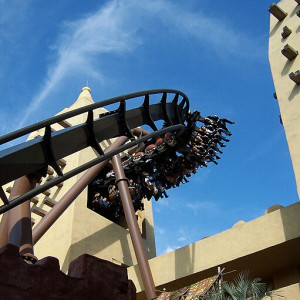
New Gen Inverted Cars Released!
Some exciting news! Now releasing is a new car style that can be used in NoLimits 2. Here's a peek at what they look like:
The set includes 3 objects:
- New Gen Inverted 4-Cross (w Color Channels) - New Gen Invert Car that has 8 color channels to customize the look of each car.
- New Gen Inverted 4-Cross (w Color Channels Alternate) - New Gen Invert Car that has 8 color channels to customize the look of each car. Color channels match the HD render version.
- New Gen Inverted 4-Cross (Custom Textures) - New Gen Invert Car that utilizes custom textures making it possible for a more customized appearance.
Small features included:
- There are row numbers on the side of each car that are automagically programmed to show the correct number in Play Mode.
- Each harness has a slight opening delay and ending angle, so they're not all identical.
- Object Parameters can alter the way a car looks: removing bogies, removing seats, reversing seats.
- On ride cameras.
- Cameras are VR-friendly. Smoothly transitioning in front of the seat when exiting.
- Low-Detail model when cars are more than 60ft (18m) away from the player.
Updates:
v2.0 Overhaul Update
- Implemented Object Parameters to the cars.
- Removed the Coaster Assigner, and the 3 Mod objects. Now Cars can be assigned via Object Parameters and all cars can be tweaked individually.
- Removed excessive files (unused classes, old icons, ect.)
The download to this set can be found in the first post in this thread.
-Josh V.
Hi! How can I install this model in NL2 for Mac (Steam)? Thank you
U might send SirMaverick34 an personal message (PM) envelope near your inlogname.
How do you make a shape bigger in the shape set?
nolimitsfan77 posted on April 30th, 2020
How do you make a shape bigger in the shape set?
Can u explain it a lil ?
I think I know what they're talking about.
So, when you double click on the shape, you'll bring up the Scene Object Instance Properties window. There'll be a few entry boxes under Scale, which'll allow you to change the size of it. Any number greater than 1 will make the object bigger in that dimension.

Thank you.
SirMaverick34 posted on January 27th, 2018
Hello all! I will be posting my creations to this thread which are primarily ride and scenery sets for NoLimits 2.
Installing & Using Sets
Sets are in the .zip file format, to use any of the sets you must extract the .zip file into your park's directory. This is found at:
Documents/com.nolimitscoaster.nolimits2/(Park Name)/(Extracted .zip file goes here). That's all that needs to be done to add these to a park! From there navigate to the Scenery Tab in the NoLimits 2 Editor and click theChoose...button. Click onPark Baseand navigate to the extracted .zip folder. There will be a list of objects that can be placed down in the editor.Quick Notes:
- All rides and nearly all Add-ons and scenery sets are recolorable! Double click the object to recolor them!
- For Ride sets, place down and position the ride first before placing any ride Add-Ons.
- Rides and their respective Add-ons need to be placed at the exact same location, and rotation! Copy and paste the those XYZ position and Y rotation from the ride to its Add-ons!
Ride Sets
Download Download Download Download Download
Download Download Download Download Download
Download Download BETA Download Download Download
Scenery Sets
Download Download Download
Coaster Cars
Download
To use custom car set, there needs to be two coasters overlapping each other, this can easily be accomplished using the Import Coaster button and then importing the coaster from the same park that is opened. They need to have the following settings:
- Coaster 1 - Needs to have zero trains. Needs to be Frozen.
- Coaster 2 - Needs to remain in Wirefame mode. Hide Wireframe enabled. The appropriate amount of trains and cars. The custom cars will attach to this one.
Custom Cars feature Object Parameters, this means double-clicking on the car object will give extra options, such as setting the coaster, train and car the object should attach to and enabling cosmetic toggles like bogie covers, reversing seats or even removing seats.
Custom Textures can be used by placing the (Custom Textures) version of the object, this will reference the texture files found in
M34_CustomSetName\Data\Materials\CustomTexturemaking it easier to customize the cars' appearance. Photoshop, PaintNet, Gimp or any image editing program is highly recommended.Change to Play mode. Custom cars will appear to follow the hidden wire frame track.


Can you do Intamin First Gen Freefall ride?
I wish that Joshua would still make more 3ds rides. He stopped making them years ago. Can someone else do like what he did now?
When ever i try to put it on the trains keep getting flipped upside down im confused because im not sure what to name it and im doing what you want me to do for it to work
ThatOneRealSadBoi posted on November 28th, 2020
When ever i try to put it on the trains keep getting flipped upside down im confused because im not sure what to name it and im doing what you want me to do for it to work
Can u send me your PACKAGE file of your park to svhas2004@home.nl and i make it work for u.
Jetcoasterfan posted on February 15th, 2018
I am thevery first one to use your new trains? It is a portable B&M invert. I used Sokobans Superman 64 track.

How to get the track
U make a coaster from your choice and save it.
IMPORT coaster (so its a duplicate from the original, rename it differently)
Set the imported coaster to ZERO cars (use just the track) (and FREEZE this one)
Set the original coaster to HIDE WIRE FRAME TRACK (do NOT freeze it)
Place the custom coaches near the original coaster (just a much as u need)
I hope u understand.
Can anyone tell me what to do if I get the error code TrainID is invalid and Offending Object has beeb flipped ?
Did u try this :
So train 1 = 0
Train 1 has 4 rows
Row 1 Train 1 = Train 0 / Row 0
Row 2 Train 1 = Train 0 / Row 1
Train 2 has 4 rows
Row 1 Train 2 = Train 1 / Row 0
Row 2 Train 2 = Train 1 / Row 1 (and so on)
Otherwise send me your PKG file of your park to my email , Subject : NL2
no not yet thanks .
That worked! Thanks alot!