

NL2 Questions

When u download for your park, its an *.NL2PKG file.
U place it in the main directory where all your other parks are located.
Go in the EDITOR > Open file.
When that *.NL2PKG file is completely loaded and error free.
Go in the EDITOR > Extract Package > Hopefully its not Password protected.
Don't forget to save it if u change something.
Then u can look into the park what u need and copy it to your park.
But if u looking for MK1101 there is a download link
https://www.dropbox.com/sh/8t6kpu9c5rfqnc2/AADKrNAUVS5WHRh09qm93S0ba?dl=0
MrRC posted on February 10th, 2022
When u download for your park, its an *.NL2PKG file.
U place it in the main directory where all your other parks are located.Go in the EDITOR > Open file.
When that *.NL2PKG file is completely loaded and error free.
Go in the EDITOR > Extract Package > Hopefully its not Password protected.
Don't forget to save it if u change something.
Then u can look into the park what u need and copy it to your park.
But if u looking for MK1101 there is a download link
https://www.dropbox.com/sh/8t6kpu9c5rfqnc2/AADKrNAUVS5WHRh09qm93S0ba?dl=0
He's most likely on about mods, which are not the same as custom objects.
For mod files, you need to put them in the following path:
Install Directory\data
and make sure the names are arranged underneath the files already in the folder.
ThatFlyerGuy1 posted on February 10th, 2022
He's most likely on about mods, which are not the same as custom objects.
For mod files, you need to put them in the following path:
Install Directory\dataand make sure the names are arranged underneath the files already in the folder.
the thing is at the moment ( at least that i am aware) there aren't mods that directly adds a coaster style to the list and instead you need to manually add the model in the park and attach it to a coaster.

I had thought this had been asked here before, but I couldn't find anything through the search function. How does one attache custom gates to the in ride gates so that the custom gates will open. I saw BestDani had a script for attaching to other objects. But I don't know the object name to attach to? Does that make sense?

^ I don't think that can be done. Pretty sure custom station gates need to be scripted to function properly.
Womp83 posted on February 12th, 2022
^ I don't think that can be done. Pretty sure custom station gates need to be scripted to function properly.
So ya know of any existing scripts to use for custom gates?
^ Not off the top of my head. Your best bet is to have a look in the 'Mega Resource Thread'. But having a quick look in there just now, i couldn't find any sort of custom gate script.
You may have to ask someone to do one up for you.
Hi! I checked the nolimits website if they launch a new updates. Last update was in January 2020... More of two years ago... Anyone knows if nl will send an update with more features, trains,....? Thanks
There was a comment on Steam that they were working on a update.
Let me search if I can find it...
EDIT:
Here's the picture of the "Update" on Steam:
Question asked at 23-12-2021, repley from nlcoaster on 24-12-2021!!

There will be a update, but what will it be?
I hope vertical lifts, custom switches etc!
(EDIT 2): Why do my images not show in my posts?
Anyways: the link to that post: https://imgur.com/gallery/3R71iFm
(EDIT 3): Maybe because I haven't post enough on this forums :(
@ Battin :
U mean this :

Close up :

NL2 has an update 2.6.2.0
MrRC posted on March 4th, 2022
NL2 has an update 2.6.2.0
Yeah, but it doesn't give more then it already had.
I was hoping for more features, but they gave improvements (always good, don't get me wrong)
I was kinda hoping for new features, like vertical lift of something
One new option in the update I noticed that is cool is the option to hide scenery while in the editor. I chose that but now I don't know how to turn it off. Anybody have any ideas?
That was before also possible.
Now its an update to 2.6.2.2
UtahCoasterEnth posted on March 24th, 2022
One new option in the update I noticed that is cool is the option to hide scenery while in the editor. I chose that but now I don't know how to turn it off. Anybody have any ideas?
In the editor go to [Display] allmost in the middle of the screen just above your playfield.
u see this :

Na, This one. In the Scene Object Instance Properties.
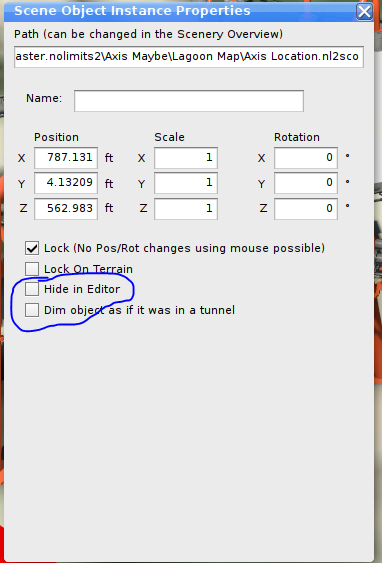
Not finding a way to turn if off now that I can't see the specific object. The Scenery is on on the menu you shared.
U can find it in the [Show Overview] thats a summary from all the objects in your park.
Double click on that object and untick the tickted box

Thanks MrRC! That's what I was looking for.
UtahCoasterEnth posted on March 25th, 2022
Thanks MrRC! That's what I was looking for.
No problem , feel free to ask again.

Anyone know where the modern 8 seat B&M dive trains are? I have found the 6-seater but not the 8. Thanks!

Is there a proper tutorial of Blender how to add a custom track to your NL2 coaster and then exporting it to NL2? Importing as CVS file into Blender is not a problem.
I'm new to Blender btw.
I went to update NoLimits 2 to 2.6.2.2 but it had an error with some files and it skipped them. It won't launch the game now due to an error. How do I fix this?
Can u make a screen shot from the errors ?
Ok, sorry if this is in the wrong category, but I have downloaded the Vekoma MK1101 coaster type.
For the new coaster type to show up in the list of available coaster types, where do I put the mod file?
Also for scenery, where do those mod files go?
Thanks