

3ds Max Track Creator V2
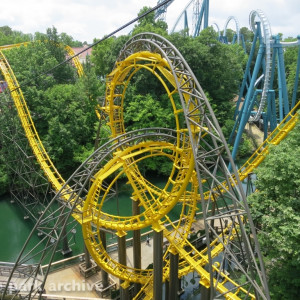
Included track styles:
Corkscrew Rounded Ties

Regular: Yes
Alternative 1: No
Alternative 2: No
Utility: Yes (lift hill)
Track gauge: 1220mm
Rail diameter: 140mm
B&M Invert

Regular: Yes
Alternative 1: Yes (medium spine)
Alternative 2: Yes (large spine)
Utility: Yes (I-beam spine)
Track gauge: 1220mm
Rail diameter: 140mm
B&M Sit-down

Regular: Yes
Alternative 1: Yes (medium spine)
Alternative 2: Yes (large spine)
Utility: Yes (I-beam spine)
Track gauge: 1220mm
Rail diameter: 140mm
Gerstlauer New-gen (light)

Regular: Yes
Alternative 1: Yes (3 tube track)
Alternative 2: Yes (heavy duty 3 tube)
Utility: Yes (2 tube, no diagonals)
Track gauge: 1200mm
Rail diameter: 159mm
Intamin Mega (Hyperion style)

Regular: Yes
Alternative 1: Yes (double spine)
Alternative 2: Yes (2 tube)
Utility: Yes (lift hill)
Track gauge: 1220mm
Rail diameter: 140mm
Intamin MK2 (Patheon Style)

Regular: Yes
Alternative 1: Yes (double spine)
Alternative 2: Yes (diagonal bracing)
Utility: Yes (2 tube)
Track gauge: 900mm
Rail diameter: 140mm
Mack New-gen (light)

Regular: Yes
Alternative 1: Yes (thicker spine)
Alternative 2: Yes (2 tube)
Utility: Yes (lift hill)
Track gauge: 1060mm
Rail diameter: 140mm
Mack Sit-down

Regular: Yes
Alternative 1: Yes (thicker spine)
Alternative 2: Yes (2 tube)
Utility: Yes (lift hill)
Track gauge: 1060mm
Rail diameter: 140mm
Meisho (Big Boom Coaster)

Regular: Yes
Alternative 1: Yes (looping box)
Alternative 2: No
Utility: Yes (lift hill)
Track gauge: 1000mm
Rail diameter: 140mm
Morgan Hyper Coaster

Regular: Yes
Alternative 1: No
Alternative 2: No
Utility: Yes (square spine)
Track gauge: 1000mm
Rail diameter: 140mm
Premier Rides

Regular: Yes (plate ties)
Alternative 1: Yes (box ties)
Alternative 2: Yes (box ties, thick spine)
Utility: Yes (double plates)
Track gauge: 1000mm
Rail diameter: 140mm
RMC Raptor

Regular: Yes
Alternative 1: No
Alternative 2: No
Utility: No
Track gauge: 318mm (12.5”)
Rail diameter: 99mm (3.9”)
S&S Sit-down

Regular: Yes (box ties)
Alternative 1: Yes (2 tube)
Alternative 2: Yes (Ring Racer plate ties)
Utility: Yes (lift hill)
Track gauge: 1100mm
Rail diameter: 140mm
S&S Thrust Air

Regular: Yes (diagonal bracing)
Alternative 1: Yes (no diagonal bracing)
Alternative 2: No
Utility: Yes (thinner ties)
Track gauge: 1400mm
Rail diameter: I-beam 150 x 300mm
Schwarzkopf Olympia Looping

Regular: Yes
Alternative 1: No
Alternative 2: Yes (looping box)
Utility: Yes (2 tube)
Track gauge: 900mm
Rail diameter: 130mm
Wooden Side Friction

Regular: Yes
Alternative 1: Yes (station right platform)
Alternative 2: Yes (station left platform)
Utility: Yes (lift hill)
Track gauge: 900mm
Rail diameter: N.A.
TOGO Default

Regular: Yes
Alternative 1: Yes (thicker spine)
Alternative 2: Yes (looping box)
Utility: Yes (lift hill)
Track gauge: 1100mm
Rail diameter: 140mm
TOGO Ultra Twister

Regular: Yes (open trough)
Alternative 1: Yes (rings)
Alternative 2: Yes (open trough reinforced)
Utility: Yes (station)
Track gauge: 2300mm
Rail diameter: 140mm
Vekoma Flying Coaster

Regular: Yes
Alternative 1: Yes (thicker spine)
Alternative 2: Yes (sideways track style)
Utility: Yes (Utility track)
Track gauge: 1100mm
Rail diameter: 140mm
Vekoma Junior Coaster

Regular: Yes (all same ties)
Alternative 1: Yes (alternating ties)
Alternative 2: No
Utility: Yes (lift hill)
Track gauge: 900mm
Rail diameter: 130mm
Vekoma MK1101

Regular: Yes
Alternative 1: No
Alternative 2: No
Utility: Yes
Track gauge: 1100mm
Rail diameter: 140mm
Vekoma Suspended Thrill Coaster

Regular: Yes
Alternative 1: Yes (thicker spine)
Alternative 2: No
Utility: Yes
Track gauge: 1000mm
Rail diameter: 140mm
Zierer / Schwarzkopf (Lisebergbanan etc.)

Regular: Yes
Alternative 1: No
Alternative 2: No
Utility: Yes (Utility track)
Track gauge: 900mm
Rail diameter: 130mm
reserved
reserved
Just a head's up - the B&M i-beam track, especially on older inverts, has a gap down the middle, and the spine depth transitions are typically smooth.
So I try to download the free trial as a business but it now needs a phone number verification. I just want this tool for blender.
I've been trying in various ways but when I open "RUN SCRIPT" the different types of tracks don't appear, would anyone know why?
you must copy the 3ds_Tracks folder included in the zip to the same directory as the script-file for them to show up
When exporting the Track to No Limits, how would it be done so that its color can be edited?
It's described in the readme. Under 'installation'
Can you take a screenshot to visualize it better?
Move the 'track' folder that came in the zip-file to your park folder. Then with the export button in the plugin, navigate to that folder and export. The nlsco file with the ability to colourise your track is in that folder as well.

Thanks!!
Hi, when importing to max using the Mack Track style, it seems to be missing out sections, any idea what im doing wrong? Also i have max units set to meters and its importing the spline 1000x smaller
Thanks!



TuckingFypo posted on February 25th, 2024
Hi, when importing to max using the Mack Track style, it seems to be missing out sections, any idea what im doing wrong? Also i have max units set to meters and its importing the spline 1000x smaller
Thanks!
Hi, it appears that you forgot to set the distance of points to 0.1m on the CSV export in NL.
As for the scaling issue, I suspect you need to make sure the display unit scale and the system unit scale is set to the same value in 3ds max:

PvM posted on February 26th, 2024
Hi, it appears that you forgot to set the distance of points to 0.1m on the CSV export in NL.
As for the scaling issue, I suspect you need to make sure the display unit scale and the system unit scale is set to the same value in 3ds max:
Thanks ill try this! The scaling yeah I've got both Display and system units set to meters
PvM posted on February 26th, 2024
Hi, it appears that you forgot to set the distance of points to 0.1m on the CSV export in NL.
As for the scaling issue, I suspect you need to make sure the display unit scale and the system unit scale is set to the same value in 3ds max:
EDIT:
This fixed the track spacing issue thank you! Fixed the scaling issue, ran the rescale utility in max to 0.01 and all is good
TuckingFypo posted on March 3rd, 2024
EDIT:
This fixed the track spacing issue thank you! Fixed the scaling issue, ran the rescale utility in max to 0.01 and all is good
Plz try to edit properly. This is very annoying.
Hey I get an error every time I try to change the section distance.
It says: Runtime error spine knot out of range: 101
file name: The script File
Line Number: 267
CCA_Games posted on September 23rd, 2024
Hey I get an error every time I try to change the section distance.
It says: Runtime error spine knot out of range: 101
file name: The script File
Line Number: 267
It could be that part of the spine got reversed. This mostly happens to me when I try to manually detach or attach parts. Try generating the track as is. It should fix the configuration spline.
PvM posted on September 23rd, 2024
It could be that part of the spine got reversed. This mostly happens to me when I try to manually detach or attach parts. Try generating the track as is. It should fix the configuration spline.
Thanks
Over a year in development, it's finally here. The next version of my track creator for 3ds Max. With this version you can:
You can download the plugin here:
Download 3ds Max Track Importer 2.1 for 3ds Max 2021 and up
How to install:
Simply unpack the zip-file anywhere you want but keep the folder structure intact. For easy access, it is recommended to extract it to your “\Program Files\Autodesk\3ds Max 20xx\scripts” folder. Next, move the “Track” folder to your NoLimits park folder. The track folder contains the predefined nl2co and nl2mat files to color and display your track properly in NoLimits2.
To run the script, start 3ds Max and select “Run Script…” under the “Scripting” Menu and navigate to the folder you unzipped the script to. Run the script and the NoLimits Track Create V2.x menu will pop up.
Please note that:
Updates:
2.1: fixed various bugs