

Amalia's GCI Bible
It's awesome to ear such a course will be released. I'll be following this thread with a lot of attention.
This sounds awesome! Can't wait.

I’m intrigued by this and can’t wait to see it!

What's in a Station?
So, the station, brakes, and lift setup: the one thing every coaster has. In this first step, I’m gonna teach you everything you need to know about taking this first step in creating your new GCI!
For the first step, we need to actually create our coaster. So that the station gates released later in this tutorial will work, please name your coaster “GCI” and create your station out of this coaster. Before placing any nodes, set the custom heartline to 0.85m or about 2.65ft, the friction to NL 2 (Not NL 2.2), and the coaster style to wooden trailered 2-seat.

Depending on the size of your coaster, the train length and block lengths will differ. If you have a 12-car train, your station block should be 57.75ft or 17.6m. If you have a 6-car train, your station block should be about 33.75ft or 10.3m. These lengths will also carry over to your transfer track. To check your station block length, select the station and look in the bottom left hand corner, it should clearly display your block length. Your station should be no more than 15-20ft off the ground, or 4.5-6m for my metric friends. Place 4 nodes, 2 loose and 2 strict in the middle, and space your station apart and place it where you want it until you get something that looks like the picture below.

After this, go to the side view of your station platform and give it a slight decline. Nothing super crazy, just a few degrees will do. This is so that the train can coast out of the station.

After you’ve done that, it’s time to place our transfer table. I recommend looking up a few basic station setups for a GCI coaster, as there are plenty of ways you can place the transfer and the lift relative to the station. For mine, I decided to go with a setup similar to Prowler at Worlds of Fun, with the transfer track just a short bit away from the station. Your transfer block should be the same length as the station.
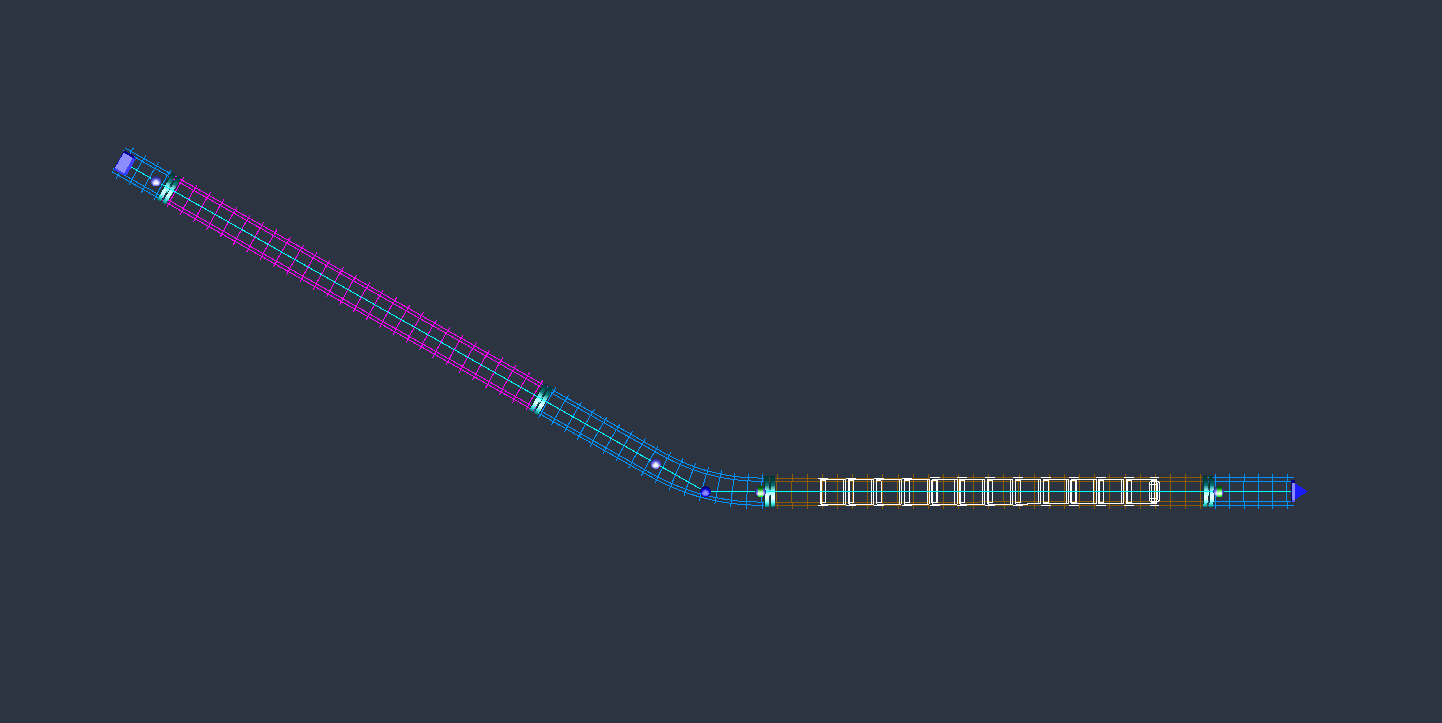

For comparison, the transfer blocks on Tornado look like this:
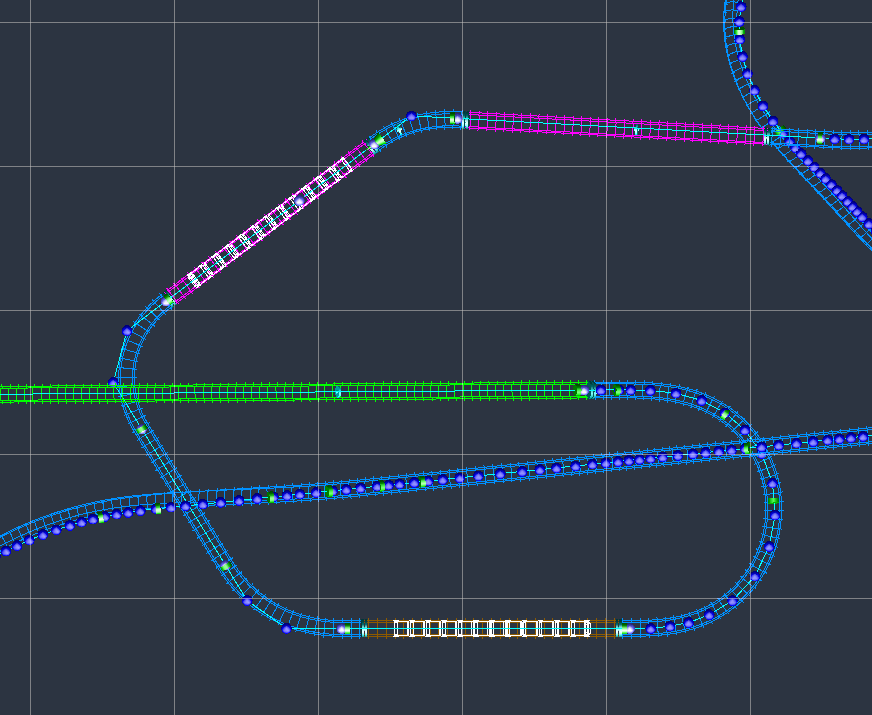
After this, input these settings into both the station and transfer blocks. Put your game into the metric system for a hot second just to get this done. Assign Train 1 to the station block and Train 2 to the transfer block. Never have a train start on the lift or on the final brake run.


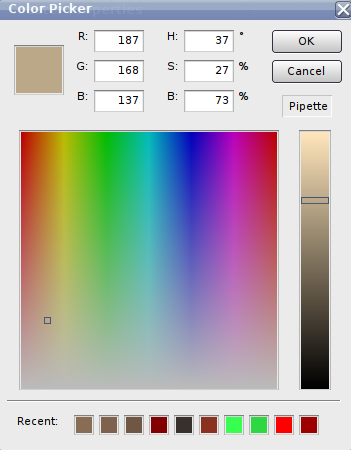
For coloring the ride, this is the color I use for the wood on the ride.
After that, freeze it up, and pat yourself on the back, because you’ve just created a GCI station block. I'm sorry I couldn't do more - these take a little while to make and going as in-depth as I am will take some time to fully cover everything GCI. Stay tuned in the coming days because the next post will be all about prelifts, lift blocks, and lift crests. The post after that will be drop shaping and hill shaping.
Thanks everyone, cheers!!

This is awesome! Thanks for doing this.
while school has prevented me from making a proper episode, i should mention that im able to get the old support gen for those who want it!! ive had an old update of nl2 lying around on my comp for a while, its so old that it still has the define/copy and define/paste functions instead of the key shortcuts! this support gen is far more realistic for gci coasters and is necessary for custom supporting
email me your pkg file and ill send it right back with the old gen supports!!
itsamaliab@gmail.com
What's the difference, exactly, between the old and new gen support generator?
GigaG. The new one is designed for RMCS' and looks awful on GCI's.
what ppboy had said
When is the next episode coming? You've made a great start and I am interested in what's coming next!
we need a new episode.

I downloaded your park and I was hoping to unfreeze the coaster to answer my question but it's password protected, which is all good. I just was wondering on a GCI whats the max banking for their banked turns?
Hi all!! I’m here today to release some of my methods used for creating GCI rides to a fine tuned quality and polished look. In this first part of a multi-step process, I’ll be showing you how the fundamentals of GCI shaping work in Nolimits 2. Please note that you will be handbuilding a GCI from the ground up - if you are a user of FVD some of the discussion of forces will apply, however methods for actual track shaping will not. This thread will formatted similarly to Element 115's Handbuilding Bible on this forum.
Over the course of this thread we’ll look at lots of things, including but not limited to:
-Track Shaping
-Forces
-Top-Down Shaping
-GCI Quirks and Features - Shaping quirks and weird GCI things.
-Track Detailing - Sensors, Wood blocks, and in-station assets.
-Custom Supporting
I hope this all helps the lot of you create some stellar GCIs in the coming months. I know that GCI has been a popular style of wooden coaster but few people know how to do them right, myself included in a lot of ways, so I thought I’d make this to help people get their GCIs as good as they can possibly be. Your finished product should end up looking something like my GCI Tornado, which you can check out here: https://nolimitscentral.com/exchange/park/967
Please check back in the future, potentially later today. I’m working on putting together a basic shaping guide for the first post.
Cheers!!