

SLC glitching
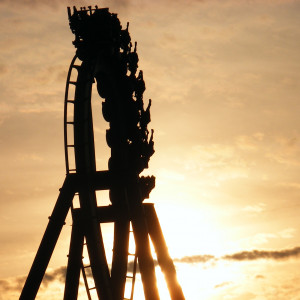
The end point can act as a roll node. Try double clicking on it and setting it to "strict" at 0 degrees. If that doesn't work, connecting the coaster so it's a complete circuit will fix it. If you're making a shuttle coaster and the "strict" thing doesn't work, you can add more track beyond it, add a roll node a bit before the end, then add a divider and make the end section invisible.
You also might have too many control points there. Check it out in wireframe mode.
Tried to make it a full circuit, but that didn't fix the problem, unfortunately.
Guess NoLimits 2 designed the SLC to be painful like in reality... ;)
AwesomeCoasters posted on September 11th, 2019
By the way, can you see the picture??
Doesnt seem like your picture is working
Edit: I've included your picture here:

I could see the picture when I clicked on it but not in the post, though it works in the above post.
Have you looked at the wireframe? It seems like there might be an extra track node or two there. Get a screenshot of that. Or try selecting all the nodes there and deleting them. You can insert a node to fix the shaping after.
raptoralex posted on September 12th, 2019
I could see the picture when I clicked on it but not in the post, though it works in the above post.
Have you looked a the wireframe. It seems like there might be an extra track node or two there. Get a screenshot of that. Or try selecting all the nodes there and deleting them. You can insert a node to fix the shaping after.
It's not the vertices. This thing only happens at roll points...
I think the problem is like what has been said before, go and take a look at the endpoint of your track, the arrow thingy.
It's what some people don't realize a node and roll node in one. So if you want the track to end on a different rotation as 0 degrees than I suggest using the select tool to double click on the end node of your track and setting it to the prefered rotation that you desire and that should do it.
If this isn't what you want or doesn't fix your problem, I'd be happy to help out.
Email me your park at sjoerdvanbladel@gmail.com
Discord for contact: sjoerdvanbladel#3459
Sjoerdvanbladel posted on September 13th, 2019
I think the problem is like what has been said before, go and take a look at the endpoint of your track, the arrow thingy.
It's what some people don't realize a node and roll node in one. So if you want the track to end on a different rotation as 0 degrees than I suggest using the select tool to double click on the end node of your track and setting it to the prefered rotation that you desire and that should do it.If this isn't what you want or doesn't fix your problem, I'd be happy to help out.
Email me your park at sjoerdvanbladel@gmail.com
Discord for contact: sjoerdvanbladel#3459
Uhm, I don't think you understand. It's the inversions/turns, that's doing that weird thing. For example, a zero-g roll. It gets edgy like on the picture and this thing has happened 8 different places throughout the layout.
Hello,
perhaps there are two roll points very close to each other with different roll angles or two roll points at the same place. Ich have made a lot of zero-g rolls without any problems. I have set 5 roll points equally distributed on the parabola section of the hill from 0° to 360° in +/-90° steps (for angles >180° i have subtracted 360° so 270° becomes -90° and 360° becomes 0° but it is not necesary).
Best regards
AndyW I know how to make coasters, and it's not 2 roll points close to each other. And it's not only the zero-g rolls. It does that glitch in a dive loop, 2 zero-g rolls, and 2 turnarounds. I don't know what's wrong with the SLC. I've made plenty of other coasters, but this is the first time this has happened to me.
It's like the SLC can't do snappy transitions.

You're going to have to post the park so people can look at exactly what is going on and recommend solutions.
-Ride_Op
Yeah, AwesomeCoasters, could you consider emailing it to me, or providing a download link, we'd like to help you, but I don't think we have enough info to help you get an answer.

I got the park package and i fixed the problem

And when i changed it to C.O.R. all UNSMOOTH was gone !!
So what was the problem? The custom heartline? Or did you change it to the default C.o.R.?
I got the parkpackage with the Heartlining set to Custom and there was a problem u can see it here :
When i changed to C.o.R. the problem was gone.
And it was all smooth again.
It seems as it's only the X-offset that causes those artefacts though. The Y-offset seems to produce results as intended even when using absurdly large values
Imaginaut posted on September 18th, 2019
It seems as it's only the X-offset that causes those artefacts though. The Y-offset seems to produce results as intended even when using absurdly large values
OK let me try this real quick.
EDIT :
Indeed when i set Hearthlining to this :

Still smooth
Thank you guys so much for helping me! Problem fixed :)
No problem, we're always happy to help out.
Do hit us up if you ever run into problems again (but dont be shy about sharing your park file next time ;) )
I am making a coaster with the Vekoma SLC style (Inverted coaster 2 seats across)
It is doing a weird glitch pretty often, where it gets edgy. This happens when it rolls.
Pls, help me!