

Nova Rides DCU Park Thread (also hi I'm new)

Welcome! For your pre-launch brake issue, are you putting a transport section on the brake? If you make it come to a complete stop and check the "launch" box, it should work. And as for adding another train, are any of your brakes block brakes? Make sure you have enough block sections to allow for multiple trains. As for a drive drop, I'd definitely make it as a geometric section. Doing it as a force section would be really tough. Maybe switch to force in a convenient place like the pullup into whatever the next element will be.
Like make the whole section a really big brake section? I tried putting a little brake section before the transport and it wouldn't continue even with transport and launch checked.
Also the 2 little wireframe trains shows up when I put in 2 trains, but neither of them move in the sim.
Flug Der Damonen for one defs looks like it turns a full 90 degrees before even pitching down. Does that sound right?
Nah, just put a short brake section (long enough to hold the whole train obviously) before the launch and have it launch from there. Weird that it isn't moving but it still sounds like it could be a block problem. Is the holding brake before the launch a block brake? If it is, maybe the train isn't clearing the block after it, preventing it from moving. Do all block brake sections have transport devices with enough power to move the train past the brake (or are they angled enough for the train to move via gravity)?
As for the dive drop, I've never ridden one but around 90 degrees sounds like a good place to start pitching down. Once you actually start building it you'll probably get a better idea of what looks right and what doesn't.

So I got a decent amount of the layout done. I'm pretty happy with the shaping on the dive drop, but the dive loop afterwards is a little wonky. I found out the hard way that dive loops in FVD AREN'T just an immelman in reverse. Next I'm stuck on the ampersand I mentioned in another thread.
B&M is a lot harder than I thought it was...
Do they have that little pre-drop before the dive loop? I thought it was a straight segment. Looks pretty good though.
Oh shucks you're right. They don't. I'm so used to B&Ms having a pre-drop but wing coasters don't. How would I prevent a rollback on the lift then cause right now it seems like one the front train leaves the chain section, it drops and if I don't go far enough, it rolls back
Actually, I'm pretty sure that B&M has stopped with pre-drops altogether. Taking a look at the coasters that typically have them, Nitro at Adlabs Imagica is the most recent floorless and it has no pre-drop, and Banshee being the most recent invert has no pre-drop as well.
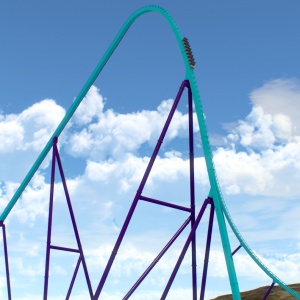
The straight section after the lift is sloped downward to prevent rollbacks.
I've finished the layout! Now to move onto scenery and supports.
Is there a way to export a NL2 track to use in 3d software?
Yes, you can export but you need the pro version. Also, I can't see the G forces but I can tell some of those banking transitions are too quick for a wing coaster. Do the laterals get really high at times? Especially toward the end.
They're normally p good. The only time they go yellow is on the last turn into the brake run and that's an easy fix since it's a curved geometry section. I was actually a little concerned about the clearance in some spots. It passes the tunnel test on the turnaround helix thing (the reverse Rip Ride Rockit one) but going under that hill it gets a little close. I don't think a rider could feasibly stick their arm out and cut their hand off on the track and the two hills are way too close for both trains to pass there, but it's hard to say since I've never ridden a wing coaster before.
Is there a way to upgrade to pro or do I have to repurchase the whole thing?
You can upgrade, just go to the Nolimits website and purchase a pro upgrade license. you can enter the key and stuff within the program itself on the main menu, regardless if you have the steam version or not

Looks, pretty good! Personally, the color scheme is not for me but that's just my opinion. But great work! :D
Hey everyone! My name is Nova and I'm new to your forum thing! I used to make coasters way back in the day in No Limits 1 and RCT3 but I like the NL2 gives you even more control to make a whole park. In light of that, I've decided to start a park inspired by my love of DCU comics (in celebration of Free Comic Day yesterday). So far I've only got one (sorta) completed.
The layout for this one is done, but I think I'm going to wait until the layout for a few more rides are done before I start putting in supports and pretty stuff.
Speed Force was originally inspired by Dodonpa but ended up taking more of a turn towards blue fire and other Mack stuff. Top speed is 100 mph. I'm a little versed in newton2 back in the day so I tried FVD++. Here's a video:
I am having a few issues, though, that I don't know how to fix. For one, I want the train to stop at the launch beforehand but when I put a brake segment, the car stops and doesn't continue. Also I have absolutely no idea how to rig a transfer track for storage. Also also, when I try to put another train in the system, the ride just never starts.
My next ride is gonna be a B&M wingrider (I'm honestly surprised a batman wingrider hasn't been done yet but hey)
Any advice for making the a dive drop in FVD++?